

Kalari is Released
Development has been all-hands-on-deck refining our platform code and adding task efficiencies to improve load responses and reduce risks of outages. In this era of AI, increased robot traffic, and cybercriminals, website and hosting providers are tasked with adjusting in real time to threats and the new online reality. I won't attempt to explain all the technical nuances, but our immediate focus has been on improved content/media delivery, database efficiencies, and optimization of external tasks such as automated syncing to directories, external calendars, and other 3rd-party feeds. Improvements in this space are ongoing and will continue for future releases.
See our CyberSecurity Post for additional tips and info on today's web security trends.
Photo Gallery Enhancements (Bulk Upload!!!)
After multiple requests and a long-standing roadmap goal for bulk uploads to photo galleries, we're pleased to announce this significant improvement to photo galleries! When editing a gallery, a new 'Bulk Add' button will be available to select multiple images to upload.
- Galleries without an assigned size category: Images will be uploaded and immediately available within the gallery. By default, the images will be marked decorative. Images can be edited to add alt text, name, description, etc. if needed.
- Galleries with an assigned size category: Images will be uploaded but hidden initially from public view. Each image will have a 'needs review' option that, once clicked, will open the image in the cropping tool for adjustments. Images smaller than the assigned size category will be noted as 'Too Small' and can be removed.
Additional Gallery Changes
The gallery edit view has been modernized with updated edit buttons and layout.
- Image Details (edit image): Individual image properties now opens on the right side instead of a floating dialog. This improves the ability to access all fields on smaller devices.
- Link Options: within image properties have been consolidated to keep the more common fields up front for a simplified gallery management experience.
- Information Tab: Used for configuring the gallery (name, size category etc), the Information fields have been moved from the former tab to a new 'Details' button that opens the settings in a slide-out panel similar to individual image properties.
- Permissions Tab: The gallery permissions tab has been removed and is now an option within individual gallery settings menu (gear icon).
- New Download Function: A 'Download' option has been added to individual gallery settings menu (gear icon) to allow downloading all images in a gallery with a single click.
Menu Settings
We've moved the page Menu Settings from the general Page Settings area and added a new item for 'Menus' under the Advanced Settings (gear icon) for pages in the Page Tree. Menu settings are now only available for Web Administrators. Due to the complexity of Menu Settings, Content Editors would occasionally assign a page to menus, causing pages to show in unintended areas they may not have had permission to change. Since Menus can have a global effect, it was determined, with feedback from our partners, to be safer to restrict them to Web Administrators only. For most situations, a page's menu settings don't need to be adjusted.
Copy Block
A new 'Copy' function has been added to each block's 'more' menu. This allows copying an entire block's contents or settings and pasting it to a new block/section on a page or elsewhere on a website. Copying a block will save all settings and content into the user's clipboard. When adding a new block or using 'change block' for an existing block, there will be a 'Paste' option to easily replicate the copied block elsewhere. Not limited to rich text content, the copy block will copy all settings for a module/feature-based block to streamline content creation elsewhere without needing to remember which settings to change.
- The Paste option will only be visible when a user has copied block data in their clipboard/session.
- Copied blocks can be pasted on entirely different pages from where the original block was located.
- Copying a block will not remove or change the original block. Editing a newly pasted block will not affect the original block.
Image Block / Image Captions
The Image and Image with Link blocks have been merged into the same block to streamline page and story editing. The Image block now has a 'use link' toggle that reveals the link options when needed. We've also added a caption field to the image block to support displaying text captions below an image.
Note: Captions can provide enhanced storytelling opportunities within page or story content; however, they shouldn't be used in certain areas such as the website logo sections. Foxbright can customize the display of caption text by request.
Note: The Foxbright Helpdesk requires a login to view release notes and other documentation, and does not sync to individual website logins. Click 'create account' or choose Google/MS Single-Sign-On options to automatically create an account.
Related News Articles
Foxbright is excited to announce our latest release: Leyden! Full of ADA-related enhancements and quality-of-life improvements, Leyden also boasts two major new features:
Front-End Edit Access
Edit pages directly from your live website with a simple “Edit” button. Users will no longer need to navigate the page tree to access the page editor for their assigned pages.
Permission Templates
Create and assign standardized user permissions in seconds. Fast-track onboarding by applying a pre-configured permission template to ensure consistency and save time.
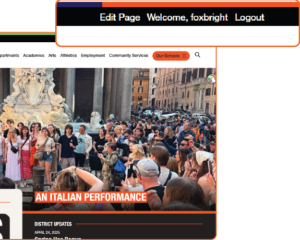 We’re excited to announce our upcoming release: Leyden, designed to make content management more intuitive for your team. Amongst myriad enhancements, two powerful new features will simplify workflows and help your team stay focused on what matters most.
Front-End Edit Access
Edit pages directly from your live website with a simple “Edit” button. Users will no longer need to navigate the page tree to access the page editor for their assigned pages.
Permission Templates
Create and assign standardized user permissions in seconds. Fast-track onboarding by applying a pre-configured permission template to ensure consistency and save time.
Stay tuned for the full release notes with additional enhancements and a full walkthrough!
To reduce risk of spam activity or AI bypassing default captchas, Foxbright highly recommends setting up reCAPTCHA for the staff directory and other website forms. Please see the attached instructions to switch to using Google reCAPTCHA. Once complete, contact [email protected] to finish configuration.
Upgrades happen, and sometimes your browser doesn't know what to do. Oftentimes, clearing your cache will resolve the issue. Still not working? Email [email protected].
- Log out of the CMS. You can log out by clicking your name in the top-right corner of the admin dashboard
- Clear browser Cache. For Chrome, paste the following into your browser chrome://settings/clearBrowserData and choose to clear for 'all time'
As a Foxbright client, you can expect:











Want to Learn More About Foxbright?



See the Difference for Yourself
Want a website that’s easy to use and backed by real people who care? Let’s talk about how Foxbright can support your organization's goals today, and for years to come.