

Something not looking right? Try clearing your cache
Upgrades happen, and sometimes your browser doesn't know what to do. Oftentimes, clearing your cache will resolve the issue. Still not working? Email [email protected].
- Log out of the CMS. You can log out by clicking your name in the top-right corner of the admin dashboard
- Clear browser Cache. For Chrome, paste the following into your browser chrome://settings/clearBrowserData and choose to clear for 'all time'
Related News Articles
Foxbright is excited to announce our latest release: Leyden! Full of ADA-related enhancements and quality-of-life improvements, Leyden also boasts two major new features:
Front-End Edit Access
Edit pages directly from your live website with a simple “Edit” button. Users will no longer need to navigate the page tree to access the page editor for their assigned pages.
Permission Templates
Create and assign standardized user permissions in seconds. Fast-track onboarding by applying a pre-configured permission template to ensure consistency and save time.
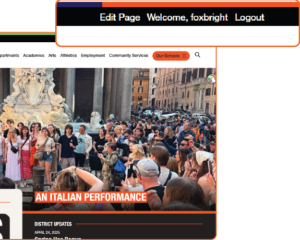 We’re excited to announce our upcoming release: Leyden, designed to make content management more intuitive for your team. Amongst myriad enhancements, two powerful new features will simplify workflows and help your team stay focused on what matters most.
Front-End Edit Access
Edit pages directly from your live website with a simple “Edit” button. Users will no longer need to navigate the page tree to access the page editor for their assigned pages.
Permission Templates
Create and assign standardized user permissions in seconds. Fast-track onboarding by applying a pre-configured permission template to ensure consistency and save time.
Stay tuned for the full release notes with additional enhancements and a full walkthrough!
To reduce risk of spam activity or AI bypassing default captchas, Foxbright highly recommends setting up reCAPTCHA for the staff directory and other website forms. Please see the attached instructions to switch to using Google reCAPTCHA. Once complete, contact [email protected] to finish configuration.
Coming right off the heels of our Jarlsberg release, we've sped up our next major release, 'Kalari,' to get some crucial optimization improvements to our partners ASAP. The good news is that some major enhancements were already underway! No need to wait for improvements to Photo Galleries (bulk image upload!!!), Copy Block functions, and refinements to our Image blocks. Most sites will be upgraded to Kalari in December 2025.
As a Foxbright client, you can expect:











Want to Learn More About Foxbright?



See the Difference for Yourself
Want a website that’s easy to use and backed by real people who care? Let’s talk about how Foxbright can support your organization's goals today, and for years to come.